

Updated: March 19, 2026 • 3 min read
Quick Professional Review
The ThinkPad T14s Gen 6 represents a solid choice for users seeking durability and emerging AI performance. Its robust build and efficient Ryzen AI Pro chipset make it a reliable asset for daily enterprise use.
Key Hardware & Upgrade Reality
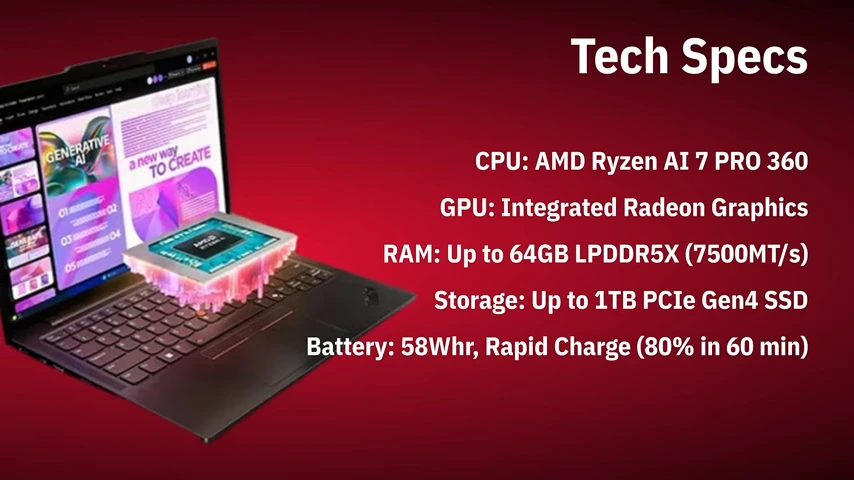
Featuring the new AMD Ryzen AI 7 Pro 360 with a dedicated NPU, this model is built for the future. However, the soldered 32GB RAM is a critical consideration. Your configuration at the time of purchase is largely final, making initial spec selection paramount for retaining its resale value down the line.
- Can Upgrade: SSD and Wi-Fi card. Easy swaps to increase functionality.
- Cannot Upgrade: RAM, CPU, or NPU. These define the platform's core capability and longevity.
Market Position & Future Value
This laptop enters a competitive segment. Its value proposition hinges on the Ryzen AI platform. For professionals considering a future trade-in or sell, models with higher specs (like this AI 7 Pro) typically command better market prices as AI features become standard. Its durable construction also supports a longer usable life.
Investment Analysis & Final Take
Why it Holds Value:
Strong brand reputation, enterprise-grade build, and forward-looking AI hardware make it a machine with a longer relevant lifespan. This directly supports a stronger future valuation.
Consider Before You Buy:
Due to soldered RAM, you cannot add more later. Weigh the cost of a higher-spec model now against the potential to recover more cash later via a manufacturer buyback program or private sale.
The Verdict: A premium, future-focused device. For the right user, it's a performant tool and a smart purchase with a clear outlook on its end-of-life value.
Another video from our YouTube/laptopnuts channel on how to disassemble Lenovo ThinkPad T14s Gen 6. Use at your own risk, this information could be used for repairing or if you need to sell the parts of your Lenovo ThinkPad T14s Gen 6 laptop. Another video from our YouTube/laptopnuts channel on how to disassemble Lenovo ThinkPad T14s Gen 6. Use at your own risk, this information could be used for repairing or if you need to sell the parts of your Lenovo ThinkPad T14s Gen 6 laptop. Lenovo ThinkPad T14s Gen 6 laptop disassembly steps:- Intro, Brief review ~0:01
- Versions & Processor Configurations ~0:43
- Design ~1:10
- External ports ~1:42
- Keyboard & TrackPoint ~2:06
- Stereo System ~2:29
- Display ~2:37
- WebCam ~3:00
- Laptop performance ~3:09
- Battery ~3:45
- Conclusion ~4:06
- Disassembly, Bottom Case Base Cover ~5:00
- Battery Removing ~5:39
- SSD Solid State Drive, RAM Memory, Wireless Wi-Fi Card ~5:55
- Daughter Board ~ 6:13
Subscribe to our YouTube channel and our laptopnuts.com/blog for new laptop related articles and videos. And please feel free to comment and evaluate how we did Lenovo ThinkPad T14s Gen 6 laptop disassembly!