

Apr 26, 2022
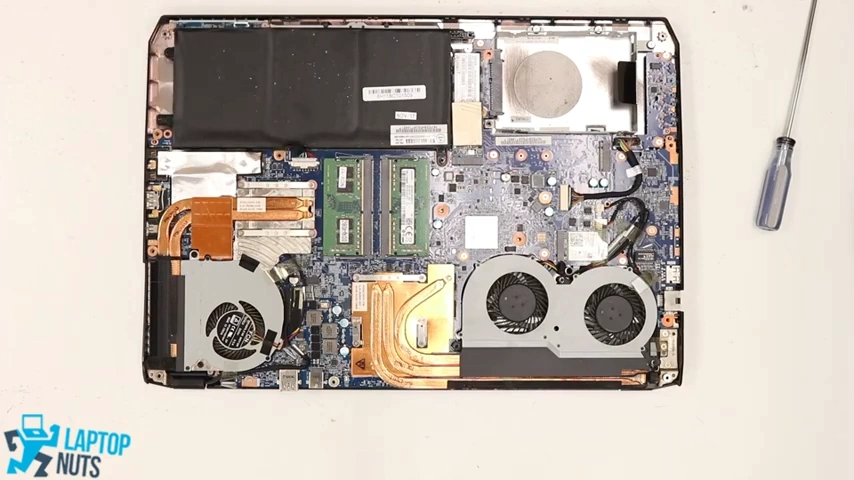
Take apart System76 laptop video from our YouTube/laptopnuts channel on how to disassemble System76 Oryx Pro in details. Use at your own risk! Laptop condition in this video is used. For demo purpose all laptops in the demo video are used, old, broken or new. This tutorial information typically used for fixing/repairing or selling System76 Oryx Pro laptop parts or recycling.
System76 Oryx Pro laptop disassembly steps:- Bottom Case Base Cover ~0:13
- Battery ~2:11
- RAM Memory ~ 2:55
- SSD Solid State Drive ~3:05
- Wi-Fi Wireless Card ~3:19
- HDD Hard Drive Caddy ~3:32
- GPU Cooling Fans w/ Heatsink ~3:56
- CPU Cooling Fans w/ Heatsink ~5:33
- Motherboard ~6:47 ~9:24
- Keyboard ~8:49
- Left & Right Speaker Set ~9:48
- Audio Board w/Cable ~10:33
- Touchpad Mouse Button Board w/Cable ~10:44
- Power Button Board w/Cable ~11:15
- Control Board w/Cable ~11:31
- Palmrest w/Touchpad ~12:02
- LCD Screen Complete Assembly ~12:51
Subscribe to our YouTube channel and our laptopnuts.com/blog for new laptop related articles and videos. And please feel free to comment and evaluate how we did System76 Oryx Pro laptop disassembly!
Need to sell your used, old or broken System76 Oryx Pro laptop? Sell it to LaptopNuts for cash online!